Review
xTool F2 Ultra Review: 60W MOPA Fiber + 40W Diode for Metal Work
xTool's flagship galvo engraver pairs a 60W MOPA fiber laser (colour marking on stainless steel) with a 40W blue diode, dual 48 MP cameras and 15,000 mm/s. Specs, prices and what hands-on reviewers found.
This page contains affiliate links; we may earn from purchases made through them. Learn more

xTool
xTool F2 Ultra
List price $5,299 (as of Oct 2026)
Best for: Production metal engraving and colour marking for a business
Our verdict
The fastest, most capable metal engraver we cover: deep relief on brass and aluminum, colour marking and quick batch personalisation, with easy software. It is a business tool at $5,299 (MOPA-only $4,299), its 220 × 220 mm area is small, and it is certified Class 4. For mostly wood, the F1 Ultra or a CO2 laser is better value.
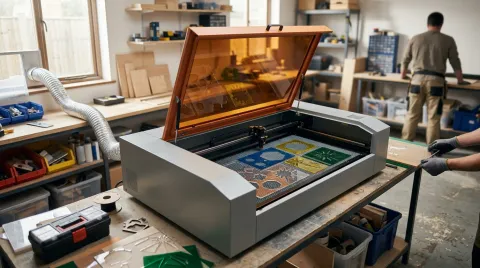
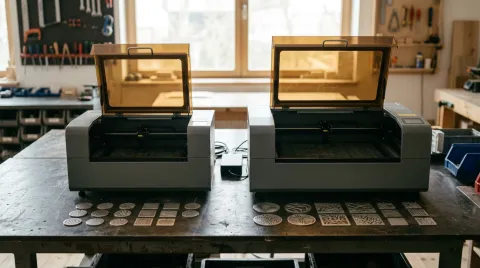
The F2 Ultra is xTool's most capable desktop engraver for metal: a 60W MOPA fiber laser and a 40W blue diode in one enclosed galvo machine, at $5,299 (a 60W MOPA-only version costs $4,299). We compared xTool's published specs with what reviewers found. We have not tested it ourselves; see how we research.
Key specs
| Spec | xTool F2 Ultra | xTool F1 Ultra |
|---|---|---|
| Lasers | 60W MOPA fiber + 40W blue diode | 20W fiber + 20W blue diode |
| Work area | 220 × 220 mm (220 × 500 with conveyor) | 220 × 220 mm (220 × 500 with conveyor) |
| Max speed | 15,000 mm/s | 10,000 mm/s |
| Thickest basswood (multiple passes) | 23 mm | 15 mm |
| Cameras | Dual 48 MP | 16 MP |
| Safety class | Class 4 | Class 4 |
| Weight | 47 lb | 32.4 lb |
| Price | $5,299 ($4,299 MOPA-only) | $2,999 |
From xtool.com, October 18, 2026.
Metal: where it shines
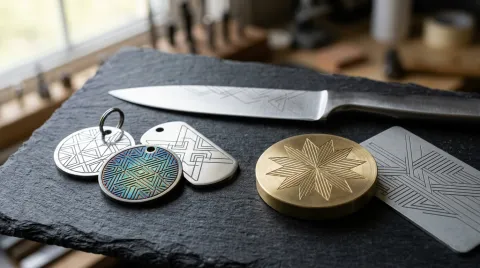
The MOPA source is the reason to buy. Hackster's Cameron Coward explains that MOPA lets you control pulse duration and frequency, which tends to give cleaner results on metal. FauxHammer found it can depth-engrave brass and aluminum rather than only surface-marking them, producing "frankly gorgeous deep engraved brass coins" (about two hours per side). Colour marking works too, but FauxHammer stresses results depend on the material and finish, so run a test grid first.
Speed and workflow
Galvo mirrors move the beam instead of a gantry moving a head, so repeated personalisation jobs are fast. Reviewers praised the dual cameras and xTool Studio's camera placement and presets; FauxHammer summed up the machine's appeal as "Usability trumps raw hardware." Deep metal relief is still slow and needs finishing.
Drawbacks reviewers found
- Small field. 220 × 220 mm limits flat work; large cuts can show angled edges far from the centre.
- Wider beam than UV. Less suited to ultra-fine line work than the F2 Ultra UV.
- Accessory quirks. FauxHammer found factory rotary alignment awkward without a third-party jig and conveyor image analysis slow, and warns that soot can build up in accessory ports.
- Price and extras. TechRadar listed the high cost with extras and limited software depth among its cons.
- LightBurn status is unclear. xTool's FAQ says LightBurn 2.2.0+ works; FauxHammer says support was dropped.
Who should buy it
A small business selling engraved metal (tumblers, knives, jewelry, tags) that wants speed and colour marking. If you mainly work in wood, the F1 Ultra at $2,999 or a CO2 laser makes more sense; compare them in xTool F1 Ultra vs F2 Ultra and see best laser engravers for metal. Despite its enclosure the F2 Ultra is certified Class 4, so read our safety guide before setting it up.
How the xTool F2 Ultra scores
8.0/10 Excellent research score- Engraving quality
- 9.5
- Cutting power
- 7.0
- Versatility
- 9.5
- Safety
- 7.5
- Ease of use
- 8.5
- Reliability
- 7.5
- Value
- 6.5
Scores come from published specs, owner reports and expert reviews, weighted by what matters most for engraving and cutting safely. How we score
Pros
- 60W MOPA colour marking on stainless steel
- 15,000 mm/s with dual 48 MP cameras
- Works with LightBurn 2.2+
Cons
- $5,299 for the dual-laser version
- Small 220 × 220 mm work area
- Certified Class 4
| Spec | xTool xTool F2 Ultra |
|---|---|
| Research score | 8.0/10 research score |
| List price | $5,299 |
| Laser | |
| Laser power | 60 W |
| Laser source | 60W MOPA fiber + 40W blue diode |
| Spot size | 0.03 × 0.03 mm (MOPA), 0.08 × 0.1 mm (diode) |
| Work area and speed | |
| Work area width | 220 mm |
| Work area length | 220 mm |
| Maximum speed | 15,000 mm/s |
| Maximum material height | 150 mm |
| Thickest wood cut | 23 mm |
| Safety | |
| Fully enclosed | Yes |
| Laser safety class | Class 4 |
| Flame detection | Yes |
| Features | |
| Camera | Yes |
| Autofocus | Yes |
| Rotary support | Yes |
| Software and connectivity | |
| Software | xTool Studio, LightBurn |
| LightBurn support | Yes |
| Connectivity | USB, Wi-Fi, IP |
| Size and warranty | |
| Weight | 47 lb |
| Dimensions | 294 × 429 × 521 mm |
| Warranty | 1 year |
| Where to buy | Check price at xTool (opens in a new tab) |
Frequently asked questions
What is a MOPA laser?
What's the difference between the F2 Ultra and the F2 Ultra UV?
Does the xTool F2 Ultra work with LightBurn?
Can the F2 Ultra cut metal?
Sources
Specs, prices and claims in this article come from these sources.
- xTool F2 Ultra product page and specifications · xTool · accessed Oct 18, 2026
- xTool F2 Ultra review: the brilliant laser hidden behind two confusing letters · FauxHammer · accessed Oct 18, 2026
- The Maker's Toolbox: xTool F2 Ultra laser review · Hackster.io (Cameron Coward) · accessed Oct 18, 2026
- xTool F2 Ultra laser engraver review · TechRadar · accessed Oct 18, 2026
Written by
Research and editing
The LaserEngravers editorial team researches laser engravers from manufacturer documents, published measurements and owner reports.